

Describe a strategy in plain words and EdgeLabHub builds it, backtests it with real costs, lets you replay the market to practise it, and then judges it on prices that haven't happened yet. When you are ready to invest, screen stocks, buy through your own broker and watch your whole portfolio.
- NQ1!21,486.25▲ 0.84%
- ES1!6,012.50▲ 0.41%
- BTCUSD98,214.00▲ 2.17%
- ETHUSD3,642.80▼ 1.12%
- EURUSD1.0874▼ 0.18%
- AAPL238.41▲ 1.06%
- NVDA142.67▲ 3.24%
- TSLA261.09▼ 2.48%
- GC1!2,684.30▲ 0.22%
- CL1!71.85▼ 0.67%
- SPY598.12▲ 0.39%
- XAUUSD2,681.95▲ 0.19%
The chart dims, a spotlight walks through the setup, the trigger, the entry and the stop, and each step says which of your rules it came from.
- 1The strategy
- 2Setup
- 3Trigger
- 4Entry
- 5Stop and target
- 6Outcome
Your own rules first: what it looks for, and what it tested at.
Five steps, one place. Each one answers a different question.
- 1
- 2
- 3
- 4
- 5
01 / 05
Describe it
Say the idea in plain words. The Copilot writes the indicator, draws it on the chart and shows the entry rules.
02 / 05
Backtest it
Real candles with fees and slippage counted. Win rate, profit factor, drawdown and an equity curve in seconds.
03 / 05
Replay it
Step through old markets candle by candle, or cut any chart at a candle and play it forward, and take trades with your risk shown in dollars before you click.
04 / 05
Forward test it
Freeze it and judge it on prices that haven't happened yet. An honest verdict after 30 trades.
05 / 05
Journal it
Log what you traded, tag the emotion behind it and grade your execution. Habits become visible.
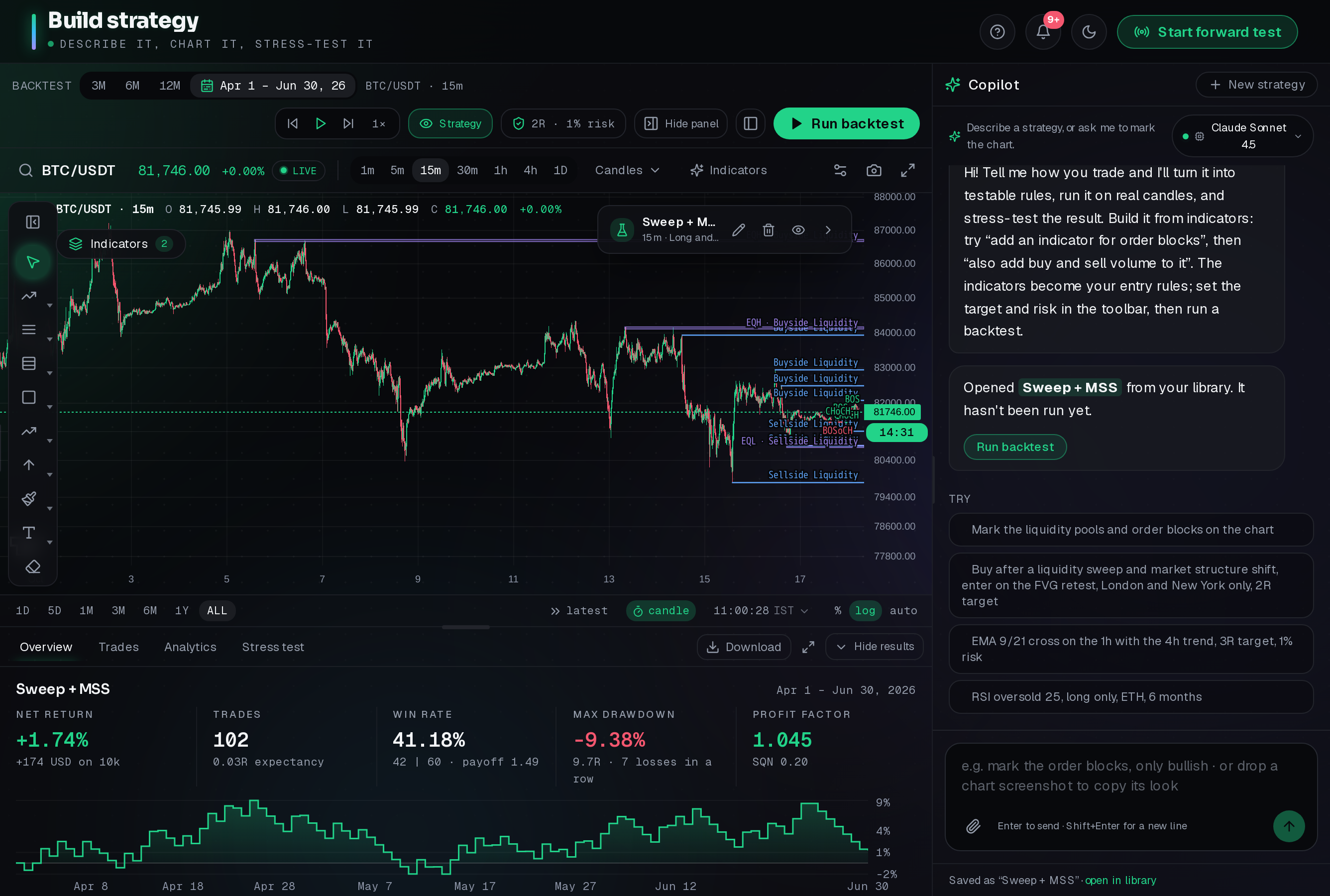
Describe a setup and the Copilot writes the indicator, marks every entry and backtests it on real candles.
1234501 / 05
Describe a setup
Say it in your own words. The Copilot writes the indicator and runs the backtest.
02 / 05
Rules in plain English
Entry, stop, target and risk are written out so you always know what is being tested.
03 / 05
Marks on the chart
Liquidity pools, structure breaks and every trade are drawn on the candles. Click one, or draw your own, and press Explain a trade.
04 / 05
Results in seconds
Net return, win rate, drawdown and profit factor, with a curve for the whole period.
05 / 05
Start a forward test
Freeze the strategy exactly as tested and judge it on the market that comes next.
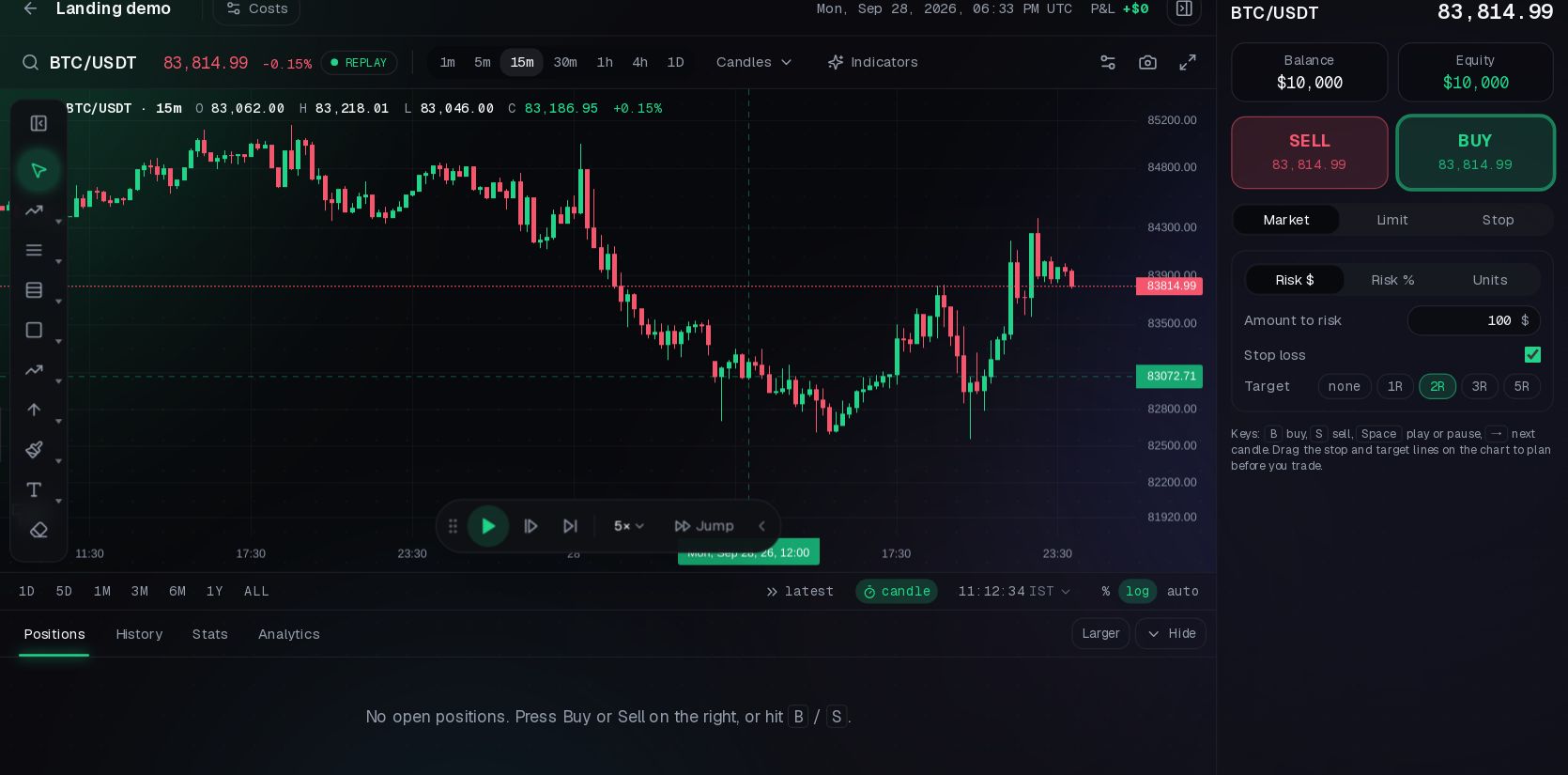
Scroll to move the market forward, candle by candle. Or cut any chart where you like and replay from there.
01 / 04
Hover BUY or SELL. Drag your stop and target out.
A line appears on the chart with SL and TP chips. Pull them to where they belong; nothing is placed for you.
02 / 04
See the risk in dollars first
"If you buy now: -$100" updates as you drag. Size an order by an amount you choose and the position follows the stop.
03 / 04
A screenshot on every closed trade
The chart as it looked, with entry, stop, target and exit, is saved on the trade for your review.
04 / 04
Move through time your way
Play up to 300×, step one candle, or jump to a date. Fees and slippage apply, and a stop that gaps fills at the open.
A forward test freezes the strategy and counts only what happens next.
 1234
123401 / 04
Frozen at a moment
Started, running for how long, and the market it has seen since.
02 / 04
Thirty trades
The ring fills toward 30 closed trades, the point where a verdict starts to mean something.
03 / 04
Trades on the chart
Each one is drawn on the candles where it was taken, with the strategy's own marks.
04 / 04
Promised vs delivered
The backtest's numbers beside what the strategy has done since it was frozen.
Replay trades arrive by themselves, and you can log or import the ones you took with any broker. Scroll to watch it come together.
01 / 04
Your numbers, at a glance
Net P&L, win rate, profit factor and drawdown, worked out from every trade you log, import or sync.
02 / 04
See the curve you are really on
An equity curve that draws itself from your first trade. Hover any point for the exact value.
03 / 04
Find what pays, and what costs
Wins against losses, and your best days, setups and hours. The patterns you could not see trade by trade.
04 / 04
Every day, green or red
A calendar of your results, with goals, loss limits and a weekly review keeping you honest.
Net P&L
+$0
Win rate
0%
Profit factor
0.00
Max drawdown
-$0
Equity curvetrade by trade
+$0
Win / loss
Daily P&L
P&L calendar
Daily goal reached
Screen stocks by asking, shortlist the ones you like, invest through Dhan, Fyers or Angel One, and watch every holding together.
EdgeLabHub never trades on its own. Every order is read back and sent only when you confirm it, through your own broker, with credentials stored encrypted.
Sample data for illustration.
Exports, risk in dollars, saved screenshots and a choice of AI.
Explain any trade you want
Click any trade and the chart tells its story: the setup, the trigger, the entry, why the stop sits there, and how it ended. It reads your own rules and your own tested results.
- Setup
- Trigger
- Entry
- Stop
- Target
- Outcome
1 of 6 · Setup
Price swept the swing high at 82,640
Take it to TradingView
Every indicator comes with a Pine Script v6 version, checked before you copy it.
Risk in dollars, before you click
Place the stop on the chart and see what it costs. Size follows the stop.
If you buy now
-$50
is what the stop costs you. Drag it and the size adjusts.
A screenshot for every trade
When a trade closes, the chart as it looked is saved with it, ready for your review.
Saved on the trade the moment it closes
Pick your AI
One choice powers the Copilot, the indicators and the explanations.
- Claude Sonnet
- GPT
- Gemini
- Built-in parser
Start free. Upgrade when your journal starts paying for itself.
Starter
Learn the workflow, free forever.
$0/ month
Free forever
Start free- 20 AI requests a month
- 1 saved strategy
- 1 trade explanation a month
- 2 replay sessions
- 1 live account connected
- Community support
- Forward tests
- Trade screenshots
Pro
For traders proving a real edge.
$23/ month
Billed $276 yearly
Go Pro- Everything in Starter, plus
- 400 AI requests a month
- 25 saved strategies
- 30 trade explanations a month
- 3 forward tests
- 20 replay sessions
- 3 live accounts connected
- A screenshot saved on every trade
- Email support
Elite
The most room, the best AI, priority help.
$47/ month
Billed $564 yearly
Go Elite- Everything in Pro, plus
- 2,000 AI requests a month
- 100 saved strategies
- 150 trade explanations a month
- 20 forward tests
- 100 replay sessions
- 10 live accounts connected
- A screenshot saved on every trade
- Premium AI models
- Priority support
Everything you need to know before your first strategy.
Buildit.Replayit.Forwardtestit.Thentrustit.
Prove it before you risk it.
Build a strategy, replay the market until you trust your execution, and let a forward test tell you the truth.
No credit card required · Free plan forever